Product
One Agentic Layer for Every Enterprise System
Everything your teams need to ask, decide and act on enterprise data in natural language, with permissions, approvals and audit logs built in.






Solution
Stop Juggling Screens. Start a Conversation.

Service Desk
" height="100px" id="UeK7YVR7h" width="100px"/><path d="M 22.324 0.379 L 24.332 5.954 C 26.562 12.141 31.434 17.014 37.622 19.244 L 43.197 21.251 C 43.699 21.434 43.699 22.146 43.197 22.326 L 37.622 24.334 C 31.434 26.564 26.562 31.436 24.332 37.624 L 22.324 43.199 C 22.142 43.701 21.429 43.701 21.249 43.199 L 19.242 37.624 C 17.012 31.436 12.139 26.564 5.952 24.334 L 0.377 22.326 C -0.126 22.144 -0.126 21.431 0.377 21.251 L 5.952 19.244 C 12.139 17.014 17.012 12.141 19.242 5.954 L 21.249 0.379 C 21.429 -0.126 22.142 -0.126 22.324 0.379 Z" fill="rgb(255, 255, 255)" height="43.575525px" id="p0r0Op1JE" transform="translate(20.72 21.546)" width="43.57359999999986px"/><path d="M 11.306 0.191 L 12.324 3.014 C 13.454 6.146 15.921 8.614 19.054 9.744 L 21.876 10.761 C 22.131 10.854 22.131 11.214 21.876 11.306 L 19.054 12.324 C 15.921 13.454 13.454 15.921 12.324 19.054 L 11.306 21.876 C 11.214 22.131 10.854 22.131 10.761 21.876 L 9.744 19.054 C 8.614 15.921 6.146 13.454 3.014 12.324 L 0.191 11.306 C -0.064 11.214 -0.064 10.854 0.191 10.761 L 3.014 9.744 C 6.146 8.614 8.614 6.146 9.744 3.014 L 10.761 0.191 C 10.854 -0.064 11.216 -0.064 11.306 0.191 Z" fill="rgb(255, 255, 255)" height="22.06750000000001px" id="H5p_UhiT3" transform="translate(56.834 56.269)" width="22.067499999999995px"/></svg>)
Hello! What would you like to know or do today?
How many purchase orders are planned?

Answer from IFS Cloud
Searched PurchaseOrderSet Found 7 planned orders
There are 7 planned purchase orders.
Ask anything...
Ask anything...
" height="100px" id="Nv8BCiiFt" width="100px"/><path d="M 41.636 21.253 L 5.177 0.444 C 4.563 0.099 3.858 -0.05 3.156 0.015 C 2.455 0.08 1.79 0.358 1.25 0.81 C 0.709 1.263 0.319 1.869 0.132 2.548 C -0.056 3.227 -0.032 3.947 0.199 4.613 L 6.926 24.246 C 6.926 24.253 6.926 24.26 6.926 24.268 C 6.925 24.275 6.925 24.282 6.926 24.289 L 0.199 43.966 C 0.014 44.489 -0.043 45.05 0.033 45.6 C 0.109 46.15 0.315 46.674 0.636 47.128 C 0.956 47.582 1.381 47.952 1.874 48.207 C 2.367 48.463 2.914 48.597 3.47 48.597 C 4.072 48.596 4.664 48.439 5.188 48.141 L 41.627 27.297 C 42.165 26.996 42.612 26.557 42.924 26.026 C 43.236 25.495 43.401 24.89 43.402 24.274 C 43.403 23.658 43.24 23.053 42.93 22.52 C 42.62 21.988 42.174 21.548 41.638 21.245 Z M 3.47 45.125 L 3.47 45.105 L 10.01 26.028 L 22.567 26.028 C 23.027 26.028 23.469 25.845 23.794 25.519 C 24.12 25.194 24.303 24.752 24.303 24.292 C 24.303 23.831 24.12 23.389 23.794 23.064 C 23.469 22.738 23.027 22.555 22.567 22.555 L 10.028 22.555 L 3.483 3.484 L 3.47 3.458 L 39.928 24.255 Z" fill="rgb(255, 255, 255)" height="48.596993758753456px" id="Dm88U7R96" transform="translate(31.948 25.708)" width="43.402350860200016px"/></g></svg>)
Service Desk
Hello! What would you like to know or do today?
How many purchase orders are planned?
Answer from IFS Cloud
Searched PurchaseOrderSet Found 7 planned orders
There are 7 planned purchase orders.
Ask anything...
Ask anything...
Service Desk
Hello! What would you like to know or do today?
How many purchase orders are planned?
Answer from IFS Cloud
Searched PurchaseOrderSet Found 7 planned orders
There are 7 planned purchase orders.
Ask anything...
Ask anything...
Talk to Your Enterprise Data
Ask questions about ERP data in plain language and get precise answers from your own environment. No screens to memorize, no tabs to juggle.
Action plan - Running
Purchase order 19
Request: copy purchase order 10
Read order lines from IFS Cloud
Create purchase order 19
Link supplier and delivery details
Write entry to the audit log
Progress
0%
0%
Action plan - Running
Purchase order 19
Request: copy purchase order 10
Read order lines from IFS Cloud
Create purchase order 19
Link supplier and delivery details
Write entry to the audit log
Progress
0%
0%
From Intent to Action
iVerse understands what the user wants, selects the right action and executes it in the right environment. Create, update and complete tasks through conversation.
Usage Overview
223
Turns today
4
Active members
450K
Tokens used
Token consumption, last 12 hours
Procurement
96 turns
Service Desk
81 turns
Finance
46 turns
Usage Overview
223
Turns today
4
Active members
450K
Tokens used
Token consumption, last 12 hours
Procurement
96 turns
Service Desk
81 turns
Finance
46 turns
See Every Conversation and Action
Track usage across teams and users, and monitor models, tokens and cost from one view.



Connect Your Enterprise Apps Securely
Connect iVerse to IFS Cloud, Microsoft Outlook and other enterprise apps through one centralized agent layer, with permission sets enforced from your own environment.

Action Plan
Chat Request
Agentic AI
Update the record
Workspace Overview
Live
223
Turns today
4
Active members
Active Workspaces
Procurement
96 turns
Finance
81 turns
Supply Chain
46 turns
Reading IFS Cloud data
Reading IFS Cloud data
How It Works
From Setup to First Conversation in Three Steps
Connect Your Environment
01
Connect iVerse to IFS Cloud and your enterprise apps. Existing permission sets carry over, so people only see what they are allowed to see.
Configure Controls
02
Choose which actions need approval, switch on Ask First mode and set up the workspaces, teams and languages you need.
Connect Your Environment
03
Teams ask, decide and act in natural language while every request, approval and outcome is logged for review.
Action Plan
Chat Request
Agentic AI
Update the record
Workspace Overview
Live
223
Turns today
4
Active members
Active Workspaces
Procurement
96 turns
Finance
81 turns
Supply Chain
46 turns
Reading IFS Cloud data
Reading IFS Cloud data
How It Works
From Setup to First Conversation in Three Steps
Connect Your Environment
01
Connect iVerse to IFS Cloud and your enterprise apps. Existing permission sets carry over, so people only see what they are allowed to see.
Configure Controls
02
Choose which actions need approval, switch on Ask First mode and set up the workspaces, teams and languages you need.
Connect Your Environment
03
Teams ask, decide and act in natural language while every request, approval and outcome is logged for review.
Action Plan
Chat Request
Agentic AI
Update the record
Workspace Overview
Live
223
Turns today
4
Active members
Active Workspaces
Procurement
96 turns
Finance
81 turns
Supply Chain
46 turns
Reading IFS Cloud data
Reading IFS Cloud data
How It Works
From Setup to First Conversation in Three Steps
Connect Your Environment
01
Connect iVerse to IFS Cloud and your enterprise apps. Existing permission sets carry over, so people only see what they are allowed to see.
Configure Controls
02
Choose which actions need approval, switch on Ask First mode and set up the workspaces, teams and languages you need.
Connect Your Environment
03
Teams ask, decide and act in natural language while every request, approval and outcome is logged for review.
USE CASES
See iVerse at Work



Release purchase requisitions without opening a single screen.
Screens to open
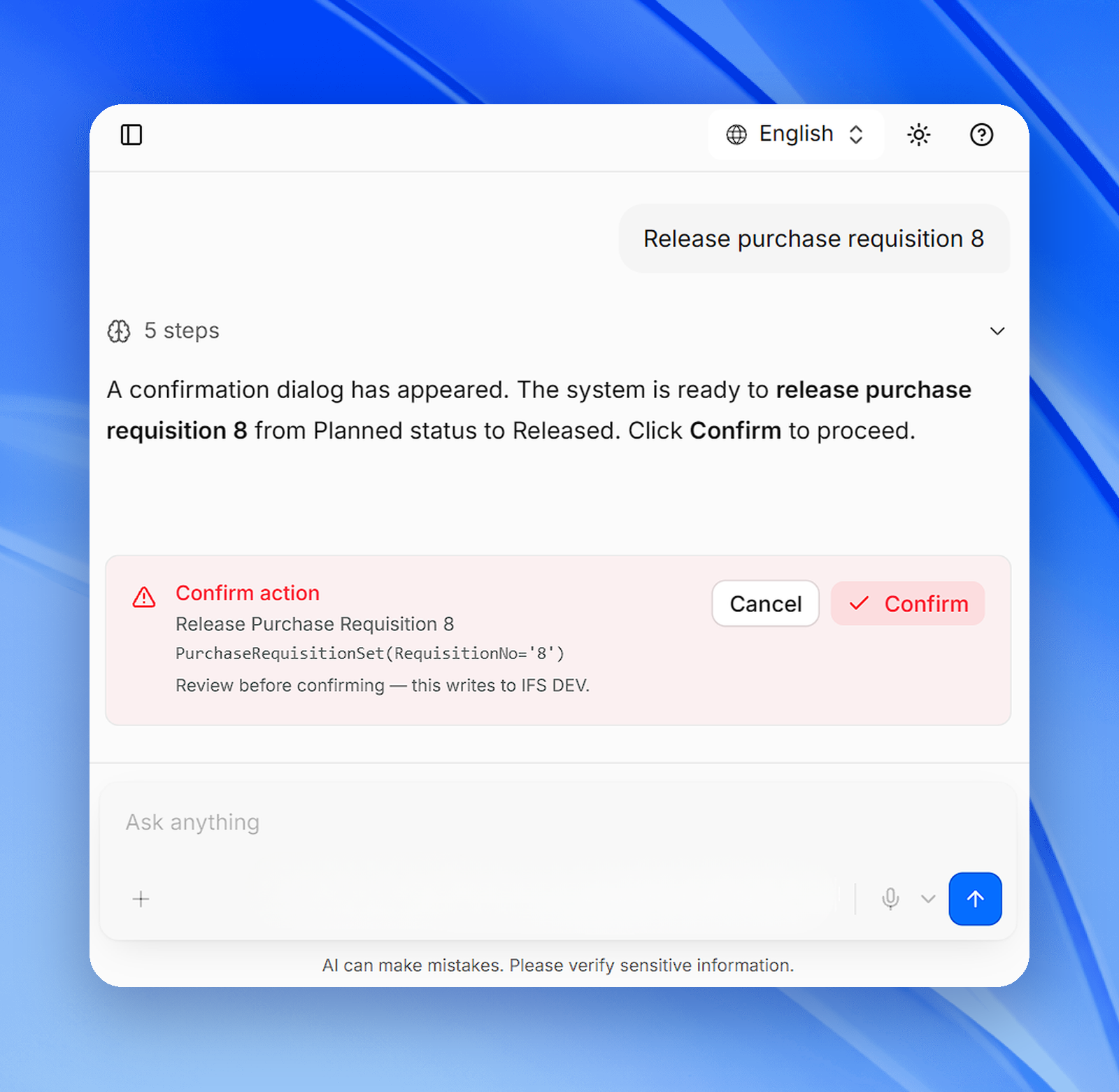
“Release purchase requisition 8.” iVerse finds the requisition, shows exactly what will change and asks you to confirm before it writes to IFS Cloud.
Example prompt
Procurement
Get answers on planned orders from live IFS Cloud data.
Screens to open
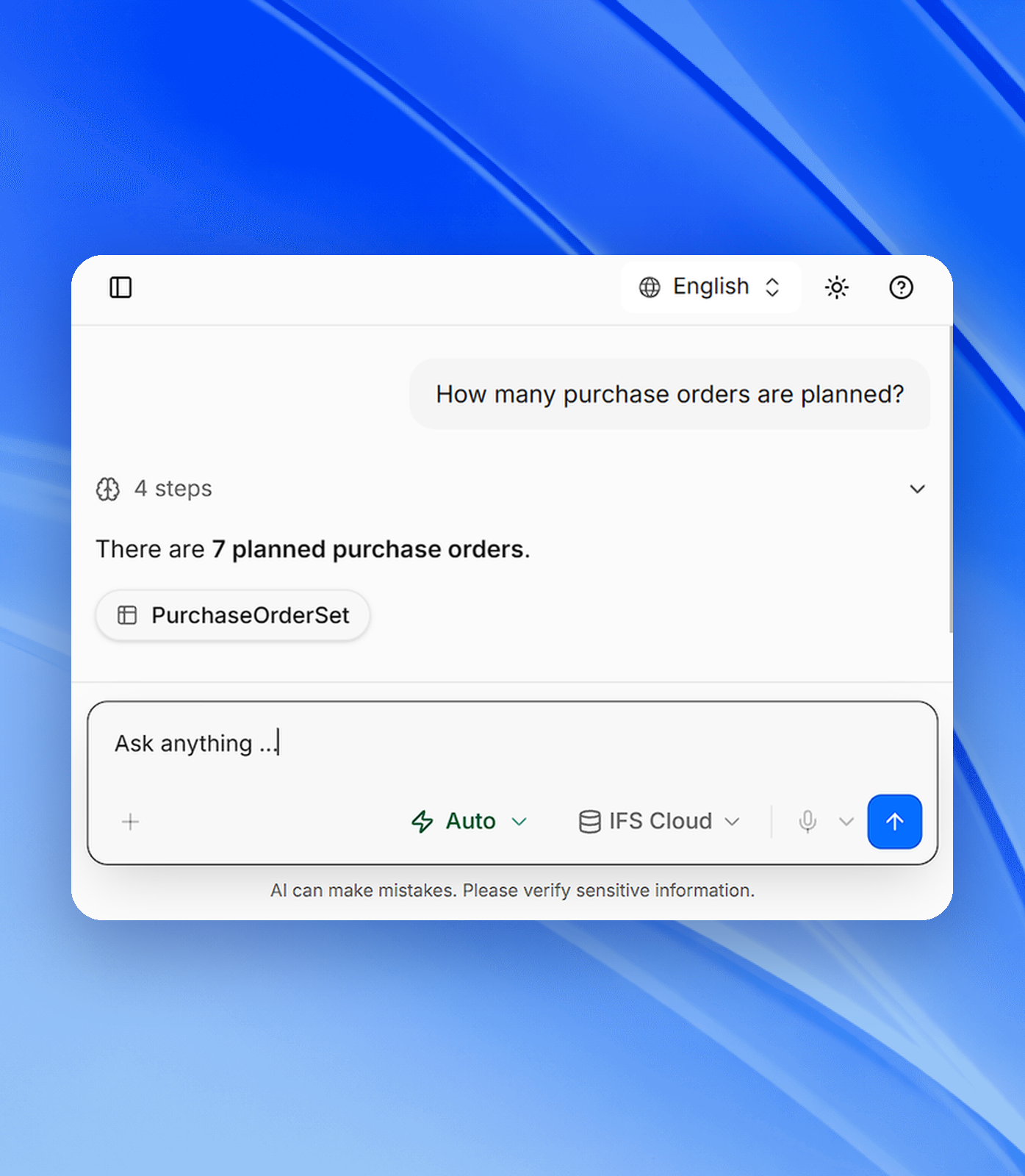
“How many purchase orders are planned?” iVerse queries PurchaseOrderSet in your environment and answers with the number and its source.
Example prompt
Supply Chain
Copy and create purchase orders in one conversation.
Screens to open
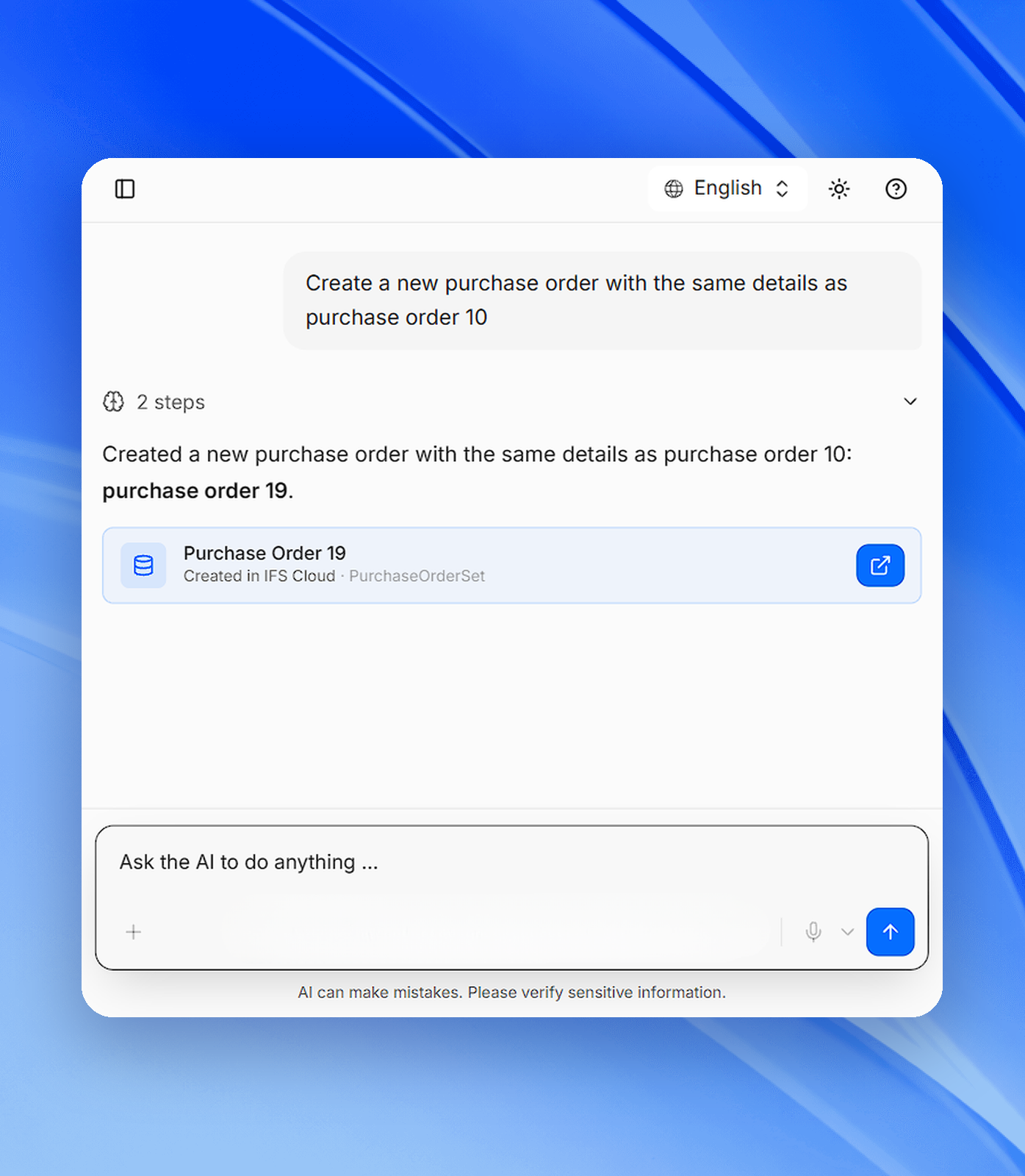
“Create a new purchase order with the same details as purchase order 10.” iVerse copies the lines, creates the new order and links it in the chat.
Example prompt
Purchasing
See usage, models and cost across every team.
Screens to open
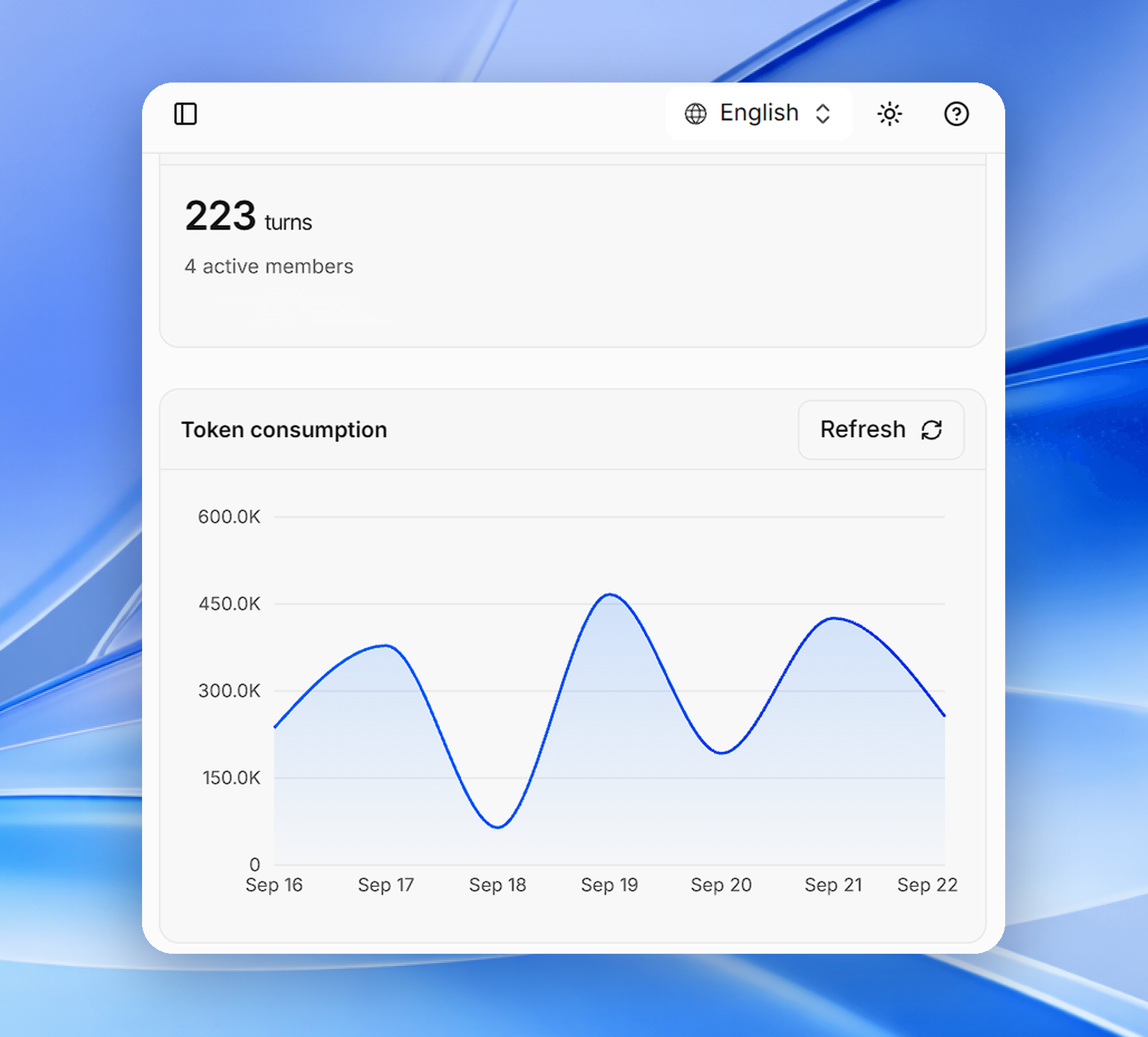
“Show token usage for the Finance workspace this month.” Admins see activity by team, model and user from one central view.
Example prompt
Administration
USE CASES
See iVerse at Work
Release purchase requisitions without opening a single screen.
Screens to open
“Release purchase requisition 8.” iVerse finds the requisition, shows exactly what will change and asks you to confirm before it writes to IFS Cloud.
Example prompt
Procurement
Get answers on planned orders from live IFS Cloud data.
Screens to open
“How many purchase orders are planned?” iVerse queries PurchaseOrderSet in your environment and answers with the number and its source.
Example prompt
Supply Chain
Copy and create purchase orders in one conversation.
Screens to open
“Create a new purchase order with the same details as purchase order 10.” iVerse copies the lines, creates the new order and links it in the chat.
Example prompt
Purchasing
See usage, models and cost across every team.
Screens to open
“Show token usage for the Finance workspace this month.” Admins see activity by team, model and user from one central view.
Example prompt
Administration
USE CASES
See iVerse at Work
Release purchase requisitions without opening a single screen.
Screens to open
“Release purchase requisition 8.” iVerse finds the requisition, shows exactly what will change and asks you to confirm before it writes to IFS Cloud.
Example prompt
Procurement
Get answers on planned orders from live IFS Cloud data.
Screens to open
“How many purchase orders are planned?” iVerse queries PurchaseOrderSet in your environment and answers with the number and its source.
Example prompt
Supply Chain
Copy and create purchase orders in one conversation.
Screens to open
“Create a new purchase order with the same details as purchase order 10.” iVerse copies the lines, creates the new order and links it in the chat.
Example prompt
Purchasing
See usage, models and cost across every team.
Screens to open
“Show token usage for the Finance workspace this month.” Admins see activity by team, model and user from one central view.
Example prompt
Administration
FAQs
Have questions? Find answers.
Have more questions?
Reach out to the Inzuverse team
What is iVerse?
iVerse is an agentic AI layer between people and enterprise data. Users ask questions and request actions in natural language, and iVerse answers from live ERP data or plans and executes the action inside systems like IFS Cloud, within each user's permissions.
Which systems does iVerse connect to?
iVerse is built for IFS Cloud and connects other enterprise apps, such as Microsoft Outlook, through one centralized agent layer. Talk to us about the systems in your landscape.
How is iVerse different from a generic chatbot?
Generic chatbots only answer and lack environment-specific context. iVerse understands intent, plans and executes actions, and operates within the permissions of your own environment.
Can iVerse change data without my approval?
Not for sensitive actions. iVerse pauses before any critical data change and asks for approval. In Ask First mode you review the action, validate the details and approve or reject it.
How is our enterprise data protected?
Users only reach the data they are permitted to see. Requests, agent actions, approvals and outcomes are kept in secure audit logs, enterprise data is not retained beyond the interaction, and Inzuscene holds ISO 27001 certification.
Which languages does iVerse support?
You can talk to your enterprise data in your own native language. iVerse understands the request and replies in the language you used.
FAQs
Have questions? Find answers.
Have more questions?
Reach out to the Inzuverse team
What is iVerse?
iVerse is an agentic AI layer between people and enterprise data. Users ask questions and request actions in natural language, and iVerse answers from live ERP data or plans and executes the action inside systems like IFS Cloud, within each user's permissions.
Which systems does iVerse connect to?
iVerse is built for IFS Cloud and connects other enterprise apps, such as Microsoft Outlook, through one centralized agent layer. Talk to us about the systems in your landscape.
How is iVerse different from a generic chatbot?
Generic chatbots only answer and lack environment-specific context. iVerse understands intent, plans and executes actions, and operates within the permissions of your own environment.
Can iVerse change data without my approval?
Not for sensitive actions. iVerse pauses before any critical data change and asks for approval. In Ask First mode you review the action, validate the details and approve or reject it.
How is our enterprise data protected?
Users only reach the data they are permitted to see. Requests, agent actions, approvals and outcomes are kept in secure audit logs, enterprise data is not retained beyond the interaction, and Inzuscene holds ISO 27001 certification.
Which languages does iVerse support?
You can talk to your enterprise data in your own native language. iVerse understands the request and replies in the language you used.
FAQs
Have questions? Find answers.
Have more questions?
Reach out to the Inzuverse team
What is iVerse?
iVerse is an agentic AI layer between people and enterprise data. Users ask questions and request actions in natural language, and iVerse answers from live ERP data or plans and executes the action inside systems like IFS Cloud, within each user's permissions.
Which systems does iVerse connect to?
iVerse is built for IFS Cloud and connects other enterprise apps, such as Microsoft Outlook, through one centralized agent layer. Talk to us about the systems in your landscape.
How is iVerse different from a generic chatbot?
Generic chatbots only answer and lack environment-specific context. iVerse understands intent, plans and executes actions, and operates within the permissions of your own environment.
Can iVerse change data without my approval?
Not for sensitive actions. iVerse pauses before any critical data change and asks for approval. In Ask First mode you review the action, validate the details and approve or reject it.
How is our enterprise data protected?
Users only reach the data they are permitted to see. Requests, agent actions, approvals and outcomes are kept in secure audit logs, enterprise data is not retained beyond the interaction, and Inzuscene holds ISO 27001 certification.
Which languages does iVerse support?
You can talk to your enterprise data in your own native language. iVerse understands the request and replies in the language you used.